System settings
What super admins set for the whole installation, and how it relates to the .env defaults.
Values saved here win over the .env defaults; without a saved value the .env value applies, and without that the built-in default.
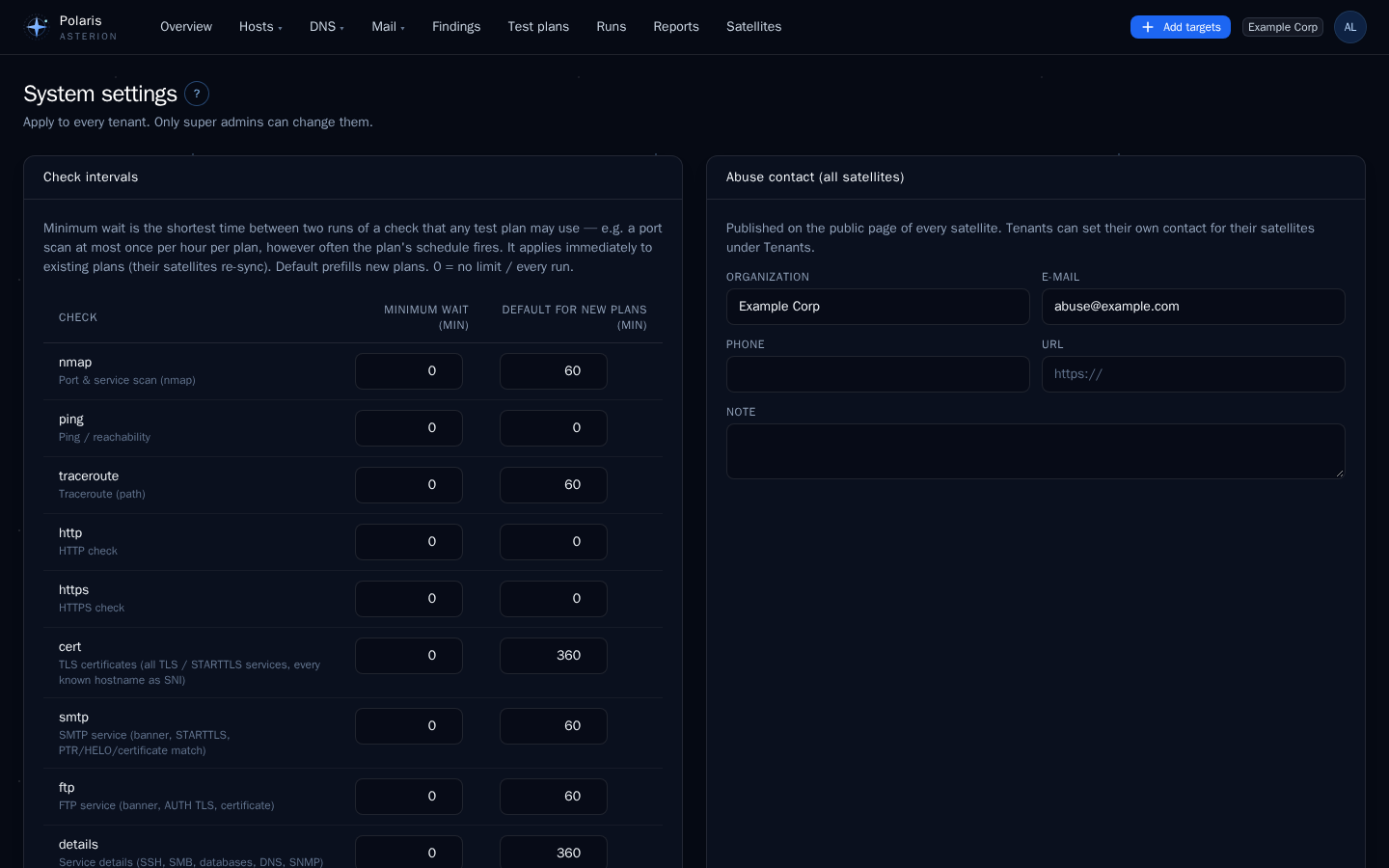
Minimum interval per check
The floor for every check: no plan may run a check more often, whatever its schedule says. Satellites enforce it too. When floors change, connected satellites re-sync at once. Default: 0 (no floor).
Defaults for new plans
The prefill of at most every N minutes for new plans, per check. Never below the floor. Built-in defaults:
| Check | Default (minutes) | Variable |
|---|---|---|
ping | 0 (every run) | POLARIS_DEFAULT_INTERVAL_PING |
traceroute | 60 | POLARIS_DEFAULT_INTERVAL_TRACEROUTE |
nmap | 60 | POLARIS_DEFAULT_INTERVAL_NMAP |
http | 0 (every run) | POLARIS_DEFAULT_INTERVAL_HTTP |
https | 0 (every run) | POLARIS_DEFAULT_INTERVAL_HTTPS |
cert | 360 | POLARIS_DEFAULT_INTERVAL_CERT |
smtp | 60 | POLARIS_DEFAULT_INTERVAL_SMTP |
ftp | 60 | POLARIS_DEFAULT_INTERVAL_FTP |
details | 360 | POLARIS_DEFAULT_INTERVAL_DETAILS |
reach | 60 | POLARIS_DEFAULT_INTERVAL_REACH |
dns | 60 | POLARIS_DEFAULT_INTERVAL_DNS |
mail | 360 | POLARIS_DEFAULT_INTERVAL_MAIL |
Abuse contact
Shown on the public page of every satellite (organisation, e-mail, phone, URL, note). Tenants can set their own for their satellites. Without a saved value, POLARIS_ABUSE_* applies.
Mail server
Host, port, encryption (STARTTLS, TLS, none), user, password and sender for system mails (password resets, reports and notifications without their own server). Without saved values, MAIL_* applies. The password is stored encrypted and is never shown again.
Internal notification servers
Notification channels may not use servers in internal networks — loopback, private (RFC 1918, ULA) and carrier-grade NAT addresses — so a tenant admin cannot reach the database, the other containers or your LAN through a channel and its Test button. Hosts, IP addresses or networks (CIDR) listed here are allowed, e.g. a self-hosted ntfy in the LAN. Link-local addresses (including cloud metadata 169.254.169.254), multicast and “this network” stay blocked in any case.
The check runs when a channel is saved and again before every message (DNS may change), and ntfy does not follow redirects. The system mail server of this page is not affected: only super admins set it.
Sign-in
Require TOTP: local users must set up an authenticator app before they can use Polaris. OIDC users are not affected (their provider handles the second factor).
Address lookup
Turns an address entered for a satellite or host into coordinates for the maps.
| Service | Operator | Notes |
|---|---|---|
| Nominatim (default) | OpenStreetMap Foundation, United Kingdom | usage policy: occasional lookups, identifying user agent |
| Photon | komoot GmbH, Germany | OpenStreetMap data |
| own server | you | a self-hosted Nominatim or Photon keeps addresses inside your network |
| off | — | coordinates are entered by hand only |
Own server (optional): empty means the public service of the chosen provider.
Privacy
Only the entered address is sent, from the Polaris server, and only when someone clicks Look up address. The privacy policy lists the services.